
About This Worksheet
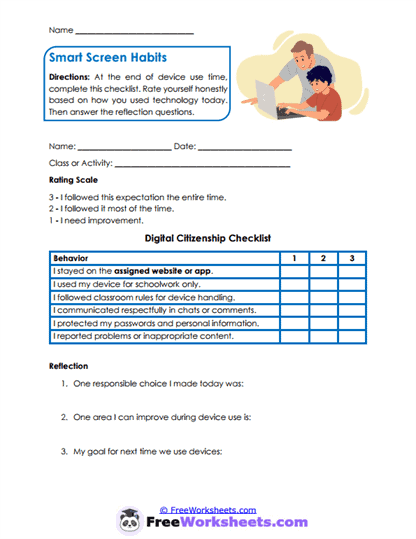
This worksheet is a digital-behavior checklist that helps students think about how responsibly they used a computer, tablet, or other device. It works well for students in grades 3 through 7 who are learning that technology use comes with rules and responsibilities. Children rate how well they stayed on the assigned site, used the device for schoolwork, followed handling rules, communicated respectfully, and protected private information. For example, “I opened a game during class” becomes “I stayed on the assigned learning website.”
Curriculum and Grade Alignment
The main goal is to help students make safe, respectful, and responsible choices while using technology. Students should already understand basic classroom rules and know that devices are learning tools rather than toys during work time. The next step is applying these habits more independently across different websites, apps, and online activities. This worksheet supports CASEL self-management and responsible decision-making because students review their choices and consider how those choices affect learning and safety.
Student Tasks
On this worksheet, students will rate six digital citizenship behaviors after using a classroom device. They decide how consistently they stayed on the assigned site, completed schoolwork, followed device rules, used respectful language, protected passwords, and reported inappropriate content. Each behavior is scored with a one, two, or three based on how well the expectation was followed. Students then identify one responsible choice, choose an area to improve, and set a goal for the next time they use technology.
Common Challenges and Misconceptions
Some students may believe that any website is acceptable as long as they are quiet while using it. Others may share passwords with friends because they do not understand why personal information should remain private. Children can also think that reporting inappropriate content will get them in trouble. Teachers can help by clearly explaining that safe technology use includes staying on task, protecting information, and asking an adult for help when something feels wrong.
Implementation Guidance
Teachers can use this worksheet after computer-lab time, online research, digital testing, or classroom activities involving tablets. It is especially useful when a student needs help understanding which technology habit caused a problem. Parents and homeschool educators can use it after online lessons, educational games, or research assignments at home. Adults should review the completed page calmly and help the child focus on one digital habit that can be improved next time.
Details and Features
The worksheet includes a clear three-point rating scale with simple explanations for each score. Six digital citizenship behaviors appear in an easy-to-read chart. A reflection section asks students to recognize a responsible choice and create an improvement goal. The one-page printable format can be reused with many different devices, websites, and classroom activities.