
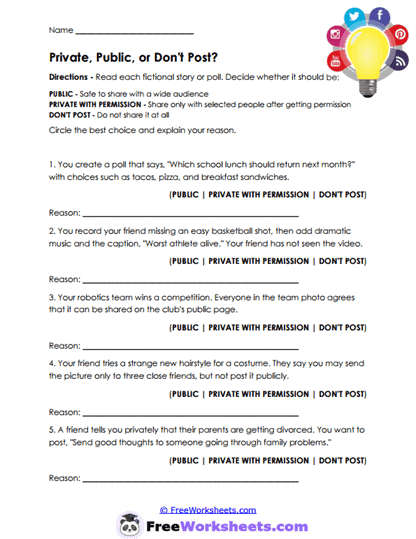
About This Worksheet
This worksheet teaches students how to decide whether digital content should be public, shared privately with permission, or not posted at all. Children read five situations involving polls, funny videos, team photos, costume pictures, and sensitive family information. They choose the safest audience for each item and explain their reasoning. The activity helps students understand that something may be harmless in one setting but inappropriate when shared widely or without consent.
Skills Developed
Students strengthen privacy awareness, empathy, digital judgment, and respect for consent. They practice considering who appears in a photo or story, whether permission was given, and whether the information belongs to someone else. The worksheet also teaches that private sharing is not automatically safe if the content is embarrassing, sensitive, or likely to spread. These skills help children think more carefully about audience, trust, personal boundaries, and the lasting effect of digital sharing.
Grade & Stage Appropriateness
This worksheet is best suited for upper elementary through early middle school students, especially grades 4 through 7. Children in this range are beginning to share photos, videos, polls, and personal information through school platforms, games, and messaging apps. Younger students may need help understanding that permission should be specific and freely given, while older students can discuss how private content may still be copied or forwarded. The situations are simple enough for younger learners but meaningful enough to support deeper conversations with older students.
Connections to Collaborative for Academic, Social and Emotional Learning (CASEL)
This activity supports the CASEL areas of social awareness, responsible decision-making, relationship skills, and self-management. Students consider another person’s privacy, pause before posting, and choose an audience that respects trust and consent. When I have used sharing scenarios like these, students often focus only on whether a post is funny or interesting. I guide them to ask a more important question: “Is this my information to share, and would the other person feel comfortable with this audience?”
Using This Worksheet
Teachers can use this page during a lesson on digital footprints, consent, privacy, or respectful online communication. It works well to discuss each scenario before students write because some situations may have more than one reasonable answer depending on whether permission was clearly given. Parents and homeschool educators can connect the examples to family photos, team pictures, private messages, and personal stories. Encourage children to build the habit of asking permission first and keeping sensitive information offline.